Co-op survival games for four players in a browser: three options
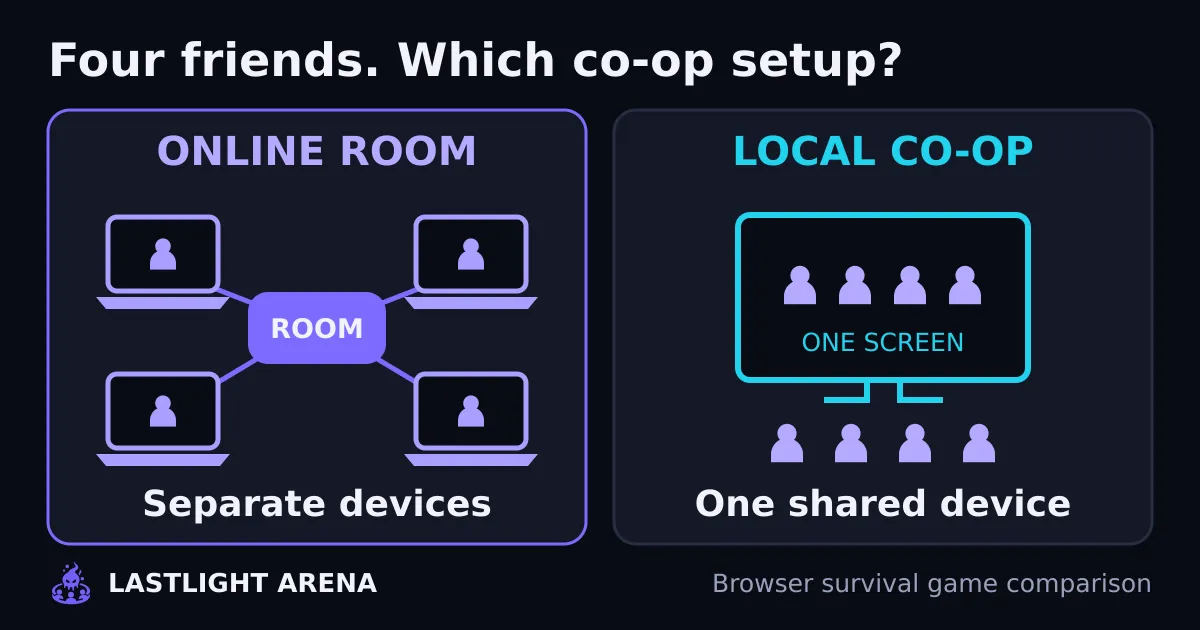
For co-op survival games for four players in a browser, choose Out 4 Blood for online desktop shooting or Quantossence for local play around one shared screen. Out 4 Blood has no touch controls; Quantossence lists keyboards/controllers and about a half-hour average session. Lastlight Arena, our game, supports separate devices and touch in five-minute rounds, but every co-op player needs an account. If everyone needs account-free online play, Out 4 Blood offers guest rooms; its session length isn't specified.
Which four-player browser co-op survival game fits your group?
Out 4 Blood — online desktop squad (official instructions)
- Joining: Up to four players on separate computers; create a room and share its invite link.
- Controls: Keyboard/mouse or gamepad. No touch; phones and tablets aren't supported. Use Chrome, Edge, Brave or Opera, not Firefox or Safari.
- Accounts: Not required for guest play; sign in to save scores.
- Time: Wave survival; session length unknown—the publisher doesn't give a duration.
Quantossence — local shared-screen group (creator's page)
- Joining: One to four players around one device and one screen, not an online room.
- Controls: Keyboards or controllers. Touch support unknown—not specified on the creator's page.
- Accounts: Requirement unknown—not specified on the creator's page.
- Time: About a half-hour average session, according to the creator; not a fixed round limit.
Lastlight Arena — short online round
- Joining: One to four players on separate devices; private invite link or room code.
- Controls: Keyboard or touch.
- Accounts: Required for each private co-op player. Account-free guest play is solo only, with unsaved, unranked results.
- Time: Five-minute survival round; joining and readying up take extra time, and a defeat can end the round earlier.
This is a setup comparison, not a ranked review. Out 4 Blood and Quantossence details come from their official pages, rechecked on 17 November 2026, not completed multiplayer playtests. We checked Out 4 Blood's guest menu and Lastlight's public solo and squad entry points; Lastlight's internal two-player gameplay capture is shown below.
Out 4 Blood: pick it for desktop zombie shooting
Out 4 Blood's official page describes a free first-person survival shooter with rooms for up to four players. Zombies arrive in growing waves, players restock between waves, and teammates can revive a survivor who goes down.
For a group already using computers and comfortable aiming in a shooter, this is the desktop-focused option. The publisher lists Chrome, Edge, Brave and Opera as supported browsers. It says Firefox and Safari aren't supported, and there are no touch controls for phones or tablets.
To gather friends, create a room and send its invite link. The game also offers open rooms and Quick game, but those aren't the same as deliberately gathering your own four-person group. According to the official instructions, AI teammates fill empty seats unless the host turns them off.
Guest play doesn't require an account; signing in keeps scores. In our browser check, the guest menu opened, but Quick game was disabled while assets preloaded. We didn't verify a connected match, so let everyone check that their menu finishes loading before committing the group to it.
Quantossence: pick it when everyone shares a screen
Quantossence's creator page describes a browser arena survival shooter for one to four players using keyboards or controllers on the same screen. Players choose heroes, fight monster waves and face bosses.
The important word is local. Sending three friends the game's URL doesn't create an online party. This option fits friends gathered around one device, not four friends each opening a laptop at home.
Before starting, check how all four players will control their characters. The creator lists keyboard and controller support; don't assume four people can comfortably use one keyboard without checking the game's controls first. The creator's listed average session is about half an hour, so this is the longer-session candidate rather than a fixed five-minute round.
Check the room before starting the survival round
For any separate-device game, get everyone into the lobby before the host starts. Use this quick check:
- Confirm the connection mode. “Four players” can mean one screen, not four online devices. Our co-op vs multiplayer explanation covers that distinction.
- Send the room invite, not just the homepage. If the game uses a code, send that too.
- Check the roster. All four friends should see the expected players, not four unrelated solo sessions.
- Check controls on each device. One friend's phone can change which game your group can use.
- Agree who starts. Finish joining and any ready-up step before launching the round.
For example, imagine three friends on laptops and one on a phone, all in different homes. Same-screen co-op won't connect that group, and a desktop-only shooter won't serve the phone player. Choose an online option with touch controls, then test everyone's entry before starting.
Once everyone can join, agree on an escape route and a turn call before the first wave. Our co-op wave-survival guide walks through that plan and includes optional solo movement and burst practice.
Lastlight Arena: pick it for a short private squad round
Lastlight Arena is our free 2D browser co-op survival game for one to four players on separate devices. Your light fires automatically at nearby monsters while you move, dodge and use a light burst to make space. The shared round lasts five minutes, with keyboard or touch controls.
The gameplay capture below shows two players in the same arena from separate browsers. It's an internal two-player test, not a four-player capture or customer activity.
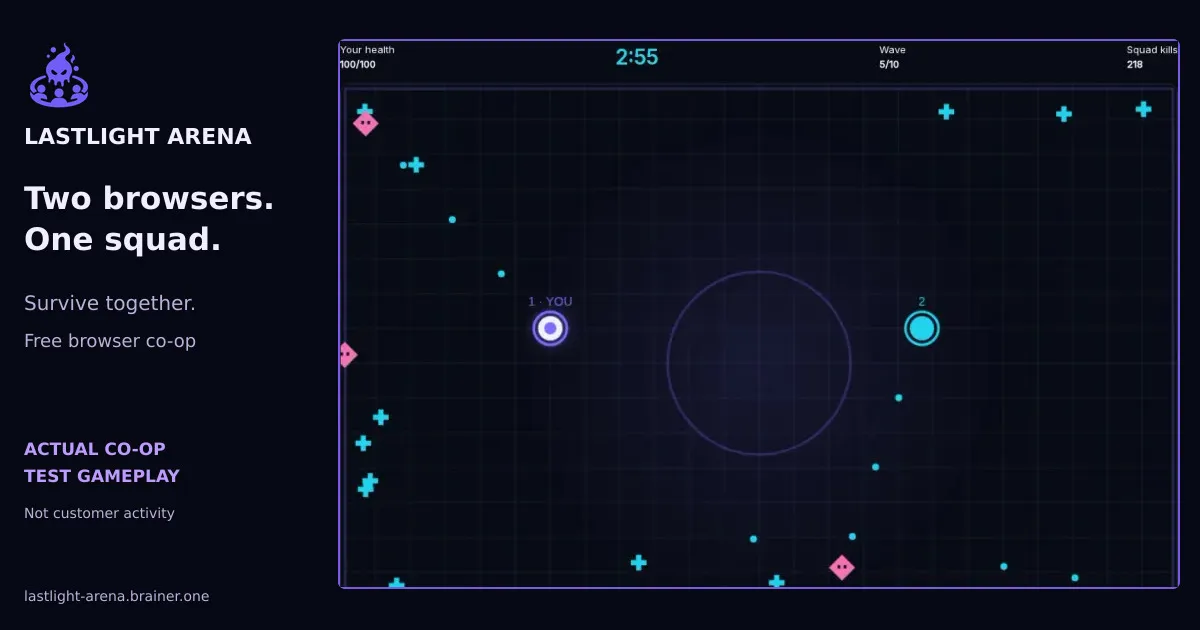
To gather your four-person group:
- Open private squad entry. Each player needs an account for private co-op and saved future results. Gameplay is free. If you want to check the controls first, guest solo needs no account, but its results aren't saved or ranked.
- The host selects Create private squad and sends the invite link or room code to up to three friends.
- Friends open the invite, or enter the code and select Join squad. Confirm all four names appear in the roster.
- Everyone selects Ready up. The host then selects Start shared round.
The illustrated browser co-op joining guide shows the actual lobby steps. Pick this option when your group wants one short shared survival goal rather than a same-screen session or a desktop first-person shooter.